Showing posts with label Antivirus. Show all posts

Wednesday, February 26, 2014

FreeFixer

FreeFixer is a general purpose removal tool which will help you to delete potentially unwanted software, such as adware, spyware, trojans, viruses and worms.
FreeFixer works by scanning a large number of locations where unwanted software has a known record of appearing or leaving traces. The scan locations include the programs that run on your computer, the programs that starts when you reboot your computer, your browser´s plug-ins, your home page setting, etc.
FreeFixer does not know what is unwanted, so it presents the scan result and it´s up to you decide if some file should be removed and if some settings should restored to their default value. Please be careful! If you delete a legitimate file you may damage your computer.
To assist you when determining if anything should be removed you can find more information at FreeFixer´s web site for each item in the scan result. You can for example see what other users chose to do in the same situation.
You can also save log file of your scan result and consult the volunteers in one of the FreeFixer helper forums.


Homepage

Download Here


Microsoft Malicious Software Removal Tool

The Microsoft Windows Malicious Software Removal Tool checks Windows computers for and helps remove infections by specific, prevalent malicious software—including Blaster, Sasser, and Mydoom. When the detection and removal process is complete, the tool displays a report describing the outcome, including which, if any, malicious software was detected and removed. The tool creates a log file named mrt.log in the %WINDIR%debug folder.
This tool will help to remove specific, prevalent malicious software from infected systems. Because computers can appear to function normally when infected, Microsoft advises you to run this tool even if your computer seems to be fine. In addition to using this tool, you should use an up-to-date antivirus product to help protect your computer from other malicious software.
This tool is not a replacement for an anti-virus product. To help protect your computer, you should use an anti-virus product.


Homepage

Download Here


Tuesday, February 25, 2014

Trend Micro Pattern File for Windows

The Official Pattern Release or OPR is Trend Micro´s latest compilation of patterns for identified viruses. It is guaranteed to have passed a series of critical tests to ensure that customers get optimum protection from the latest virus threats.

Homepage

Download Here


Avira PC Cleaner

Avira PC Cleaner is a portable malware scanner that can be used as a complement to other anti-malware software. It´s a perfect solution to remove stubborn or undetectable malware that other scanners may have missed.
Avira PC Cleaner was not designed to replace your current security software, but it is quite handy as additional protection for your computers.


Homepage

Download Here


RogueKiller

RogueKiller is a free anti-malware program that can help advanced users remove malicious programs and processes. The application, which is written in C++, is used to remove rootkits and rogue security software such as ZeroAccess among other advanced threats. However, its new graphic user interface makes it suitable for new users who rely on its basic functions. It is a small portable application that you can save in and run from a flash drive.
How RogueKiller Works
The free anti-malware program uses different methods to detect malware, including:
  • Signature finding or classic anti-malware analysis
  • Heuristics that involves studying the way malware behaves
  • Undocumented hacks
What RogueKiller Does
  • Remove malware
  • Stop malicious services
  • Find and kill malicious processes, including hidden ones
  • Unload malicious DLLs from processes
  • Remove malicious autostart entries
  • Remove registry hijacks
  • Fix Proxy, Hosts and DNS hijacks
  • Fix malicious Master Boot Record (MBR)
  • Find and restore system files that rootkit has faked or patched
  • Restore hidden files and shortcuts
Using RogueKiller
We downloaded and saved the executable file on a flash drive. The free anti-malware program started a pre-scan as soon as we launched it and then gave us the option to accept or reject the license agreement before proceeding. Pre-scanning helps to stop any suspicious processes.
Buttons for selecting desired actions are on the left part of the screen. Hovering over a button displays details about what it does, which is especially ideal for new users. Below the buttons are check boxes for enabling or disabling MBR scan, anti-rootkit and verification of fake items. The main part of the screen is divided into two with the upper portion displaying status and lower one displaying areas to be scanned.
Once we selected an action, the program ran another scan after completing the action for verification.
Pros
  • Lightweight and portable
  • Fast
  • Easy to remove rootkits
  • Helps to free some memory by terminating processes
  • Uses low RAM and CPU
  • Multi-language support
Cons
  • Interpreting results requires advanced knowledge
  • Can sometimes mark innocent things as suspicious
  • Sometimes crashes or stops suddenly, requiring a re-start
Although you can use RogueKiller to remove malware, you must exercise caution and use common sense or you may create havoc in your Windows registry by deleting critical entries. Please understand that the application does not replace your antivirus program. Instead, it can help your antivirus remove stubborn viruses by terminating their processes to clear the path, as it were.


Homepage

Download Here


HS SoBigRemover

This software must be used to detect large number of SoBig viruses in an email account and delete them remotely without the need of downloading any of them to your machine. SoBig virus is a large sized email so it uses network traffic when receiving to your machine. This software can be an indispensable tool to filter your emails from these large virused emails and remove them without wasting internet traffic.
WARNING: The software is not an anti-virus tool, it uses a filtering mechanism to detect these emails in your email account and to remove them. It is advised that you also use an anti-virus tool if you are infected by SoBig virus.

THE TOOL IS FOR MACHINES WHICH ARE NOT INFECTED BUT TO REMOVE A HUGE NUMBER OF SOBIG VIRUSES SENT TO ACCOUNTS OF UNINFECTED MACHINES.

Homepage

Download Here


Malwarebytes Anti-Malware

Malwarebytes´ Anti-Malware is an easy-to-use, simple, and effective anti-malware application. Malwarebytes´ Anti-Malware can detect and remove malware that even the most well known anti-virus and anti-malware applications fail to detect.
Features:
  • Support for Windows 2000, XP, Vista, and 7 (32-bit and 64-bit).
  • Light speed quick scanning.
  • Ability to perform full scans for all drives.
  • Malwarebytes´ Anti-Malware Protection Module. (requires registration)
  • Database updates released daily.
  • Quarantine to hold threats and restore them at your convenience.
  • Ignore list for both the scanner and Protection Module.
  • Settings to enhance your Malwarebytes´ Anti-Malware performance.
  • A small list of extra utilities to help remove malware manually.
  • Multi-lingual support.
  • Works together with other anti-malware utilities.
  • Command line support for quick scanning.
  • Context menu integration to scan files on demand.
Note from FreewareFiles: The free version does not include real-time protection, and scheduled scanning.


Homepage

Download Here


Sysinternals Autoruns

Autoruns, which has the most comprehensive knowledge of auto-starting locations of any startup monitor, shows you what programs are configured to run during system bootup or login, and shows you the entries in the order Windows processes them.
These programs include ones in your startup folder, Run, RunOnce, and other Registry keys. You can configure Autoruns to show other locations, including Explorer shell extensions, toolbars, browser helper objects, Winlogon notifications, auto-start services, and much more. Autoruns goes way beyond the MSConfig utility bundled with Windows Me and XP.
Autoruns' Hide Signed Microsoft Entries option helps you to zoom in on third-party auto-starting images that have been added to your system and it has support for looking at the auto-starting images configured for other accounts configured on a system. Also included in the download package is a command-line equivalent that can output in CSV format, Autorunsc.
What´s New in version 11.70:
  • adds a new option to have it show only per-user locations, something that is useful when analyzing the autostarts of different accounts than the one that Autoruns is running under. 

Homepage

Download Here


G Data Boot-Medium

G Data BootCD is an excellent and useful utility that will help you detect viruses that infected your PC before installing antivirus software.
Note: This download is an .iso file that needs to be burned to CD/DVD. Once burned to CD/DVD, users must boot their PC from CD/DVD drive.

Homepage

Download Here


Microsoft Security Essentials

Microsoft Security Essentials provides real-time protection for your home PC that guards against viruses, spyware, and other malicious software.
Microsoft Security Essentials is a free download from Microsoft that is simple to install, easy to use, and always kept up to date so you can be assured your PC is protected by the latest technology. It’s easy to tell if your PC is secure — when you’re green, you’re good. It’s that simple.
Microsoft Security Essentials runs quietly and efficiently in the background so that you are free to use your Windows-based PC the way you want—without interruptions or long computer wait times.
Features:
  • Comprehensive malware protection
  • Simple, free download*
  • Automatic updates
  • Easy to use
Operating System: Windows XP Service Pack 3 (SP3)*; Windows Vista (Service Pack 1, or Service Pack 2)*; Windows 7*


Homepage

Download Here


Avira AntiVir Personal

Avira AntiVir Personal - Free Antivirus is a comprehensive, easy to use antivirus program, designed to offer reliable free of charge virus protection to home-users only.
Avira offers:
  • Extensive Malware Recognition of viruses, Trojans, backdoor programs, worms, etc.
  • Automatic incremental updates of antivirus signatures, engine and entire software.
  • Permanent virus protection, with Virus Guard real time monitoring.
  • Install and configuration in just a couple of steps, setup to protect your PC in minutes.
  • Virus protection against known and unknown threats, using an advanced heuristic system.
  • Scheduler where you can set the scanner to make automatic virus scans or updates on your system.
  • Forum and phone support, Knowledge Base with virus descriptions available on web site.
  • Vista Support.
  • Rootkit Detection and Removal.
It constantly and rapidly scans your computer for malicious programs (such as viruses, Trojans, backdoor programs, hoaxes, worms, dialers etc.), monitoring every action executed by the user or by the operating system and being able to react promptly when a malicious program is detected. Actions include repair, delete, block, rename and quarantine programs or files. This application also features enhanced protection against unknown boot-sector viruses, issuing alerts for boot sectors suspicious formats. Through the permanent update of the detection engine, the protection is ensured constantly: the user can set the product to download any updates when available, thus keeping you clean and safe.
Note from FreewareFiles: The setup program includes a toolbar which does not have to be installed to use the software.


Homepage

Download Here


McAfee AVERT Stinger


McAfee AVERT Stinger is a stand-alone utility used to detect and remove specific viruses. It is not a substitute for full anti-virus protection, but rather a tool to assist administrators and users when dealing with an infected system. Stinger utilizes next generation scan engine technology, including process scanning, digitally signed DAT files, and scan performance optimizations. Windows ME/XP/Vista users:
Disabling System Restore
Windows utilizes a restore utility that backs up selected files automatically to the C:_Restore folder. This means that an infected file could be stored there as a backup file, and VirusScan will be unable to delete these files. You must disable the System Restore Utility to remove the infected files from the C:_Restore folder.

Disabling System Restore

Windows utilizes a restore utility that backs up selected files automatically to the C:\_Restore folder. This means that an infected file could be stored there as a backup file, and VirusScan will be unable to delete these files. You must disable the System Restore Utility to remove the infected files from the C:\_Restore folder.
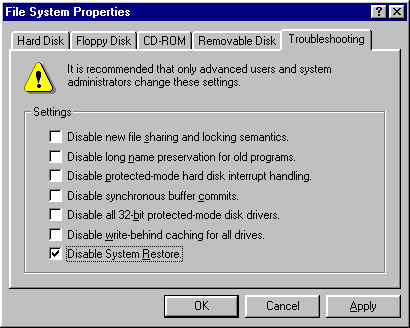
Windows ME

1. Right-click the My Computer icon on the Desktop and click Properties.
2. Click the Performance tab.
3. Click the File System button.
4. Click the Troubleshooting tab.
5. Put a check mark next to Disable System Restore.


6. Click OK.
7. Click Yes when prompted to restart.
Note: To re-enable the System Restore Utility, follow the steps above, but remove the check mark next to Disable System Restore.
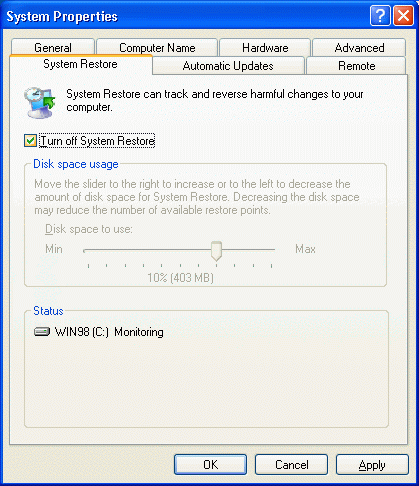
Windows XP
Disabling the System Restore Utility (Windows XP Users)
1. Right-click the My Computer icon on the Desktop and click Properties.
2. Click the System Restore tab.
3. Put a check mark next to Turn off System Restore on All Drives.


4. Click OK.
5. Click Yes when prompted to restart.
Note: To re-enable the System Restore Utility, follow the steps above, but remove the check mark next to Turn off System Restore on All Drives.

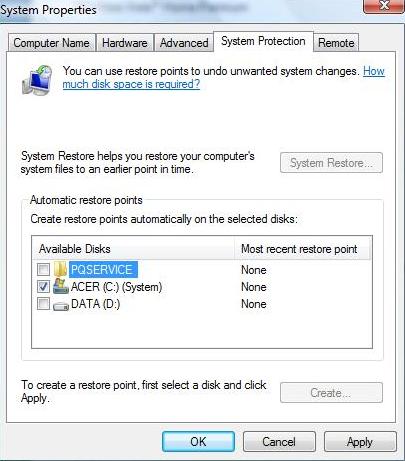
Windows Vista
1. Click the Start button.
2. Click Control Panel.
3. Click System and Maintenance.
4. Click System.
5. In the left pane, click System Protection. If prompted, enter your Administrator password or click Continue.
6. Uncheck the box next to the disk on which you wish to disable System Restore.

7. Click OK.
Note: Disabling System Protection will delete all existing restore points. To re-enable the System Restore Utility, follow the steps above, but check the box next to the disk on which you wish to enable System Restore.

Homepage

Download Here


Monday, February 24, 2014

AVG AntiVirus Free

AVG AntiVirus Free not only gives you the top-quality antivirus protection and security features that you'd usually expect only from a paid product, but added privacy features for 2014 help keep your personal information safe both online and on your PC, and the new integrated File Shredder permanently deletes sensitive files to keep them from falling into the wrong hands. Add to this our Anti-Spyware Technology and WiFi Guard, and you can be sure that wherever you are, at home or on the move, we're taking your privacy seriously.
And it's not just your PC and privacy that we help protect. Performance remains a significant factor, too. We firmly believe that antivirus software should never get in your way, so our smart scanning technology not only reduces scan times, it ensures that they take place when your PC isn't busy with other tasks. In other words, you can get on and do what you need to without any delays or interruptions.
Improvements to the interface now also give you direct access to our great range of free apps, so we can help protect your mobile and tablet, too. Combine all this with comprehensive free online technical support, and you can be sure you're getting the best possible free protection, privacy, and performance--that's now even easier to use.


Saturday, February 22, 2014

SystHeal Pro

Systheal pro v2.2 is one of the cogent and reliable software optimizer that has various devastating features creditable for providing complete security over computing world. It’s more capable for removal and protection from powerful viruses and also fixes slow PC, eliminates registry errors and automatically enhances PC performance and identifies and corrects invalid references in your windows registry remove a suspicious file and programs from your window start up that keeps clean computer’s browsing history and temporary files permanently.
Systheal pro v2.2 stays safe and secures to use & keeps hassle free environment for PC & supports different operating system with their easily install-able features that lean over backwards for optimize the PC over server based environment and system based as well
Systheal pro v2.2 believe to delivering of outstanding and sublime software for esteemed customers which face various problem in destitution of stupendous software that’s why systheal pro v2.2 has come with paramount and tellingly features that compelled for vulnerable of viruses instantly like Trojan horse- Systheal pro v2.2 more capable for removal of Trojan horse from the root from the computing environment.
Systheal software pro v2.2 have automatic detecting facility tends to outstanding performance of the computers, Due to their latest and advance functionality and various supportive features creditable for increasing the high speed of the computer over the server based environments as well system based as well and also itself, it is more capable for enhancing the downloading speed for various file and applications.
Systheal pro v2.2 is more trenchant for identification and their removal instantly for email viruses which appears during the sending mail over the server based environment. Systheal pro v2.2 have powerful feature to defrag and compacts the registry. It’s also accountable for system Compatibility with window- xp/ window7/8/vista Operating System.


Homepage

Download Here


Kaspersky Anti-Virus

Kaspersky Anti-Virus 2014 is the backbone of your PC's internet security system, delivering essential, real-time protection from the latest malware. It works behind-the-scenes with intelligent scanning and small, frequent updates, while proactively protecting you from known and emerging Internet threats. Enjoy essential protection that won't slow down your PC with Kaspersky Anti-Virus 2014

Key features:
1. Real-time protection against computer viruses, spyware, Trojans, rootkits, and more
2. Ensures vulnerabilities won't compromise your PC with Automatic Exploit Prevention
3. Website and email scanning to detect malicious software
4. Fast and efficient PC performance
5. Rapid reaction to new and emerging threats
6. Instant safety checks on files, applications and websites
7. Rollback of harmful malware activity

Homepage

Download Here

RegRun Security Suite Platinum

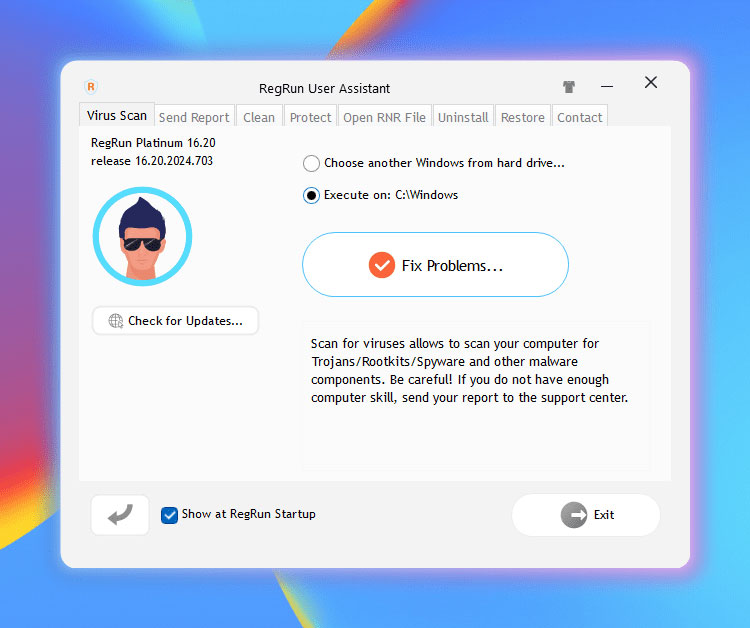
RegRun Suite is a complete computer security software. RegRun Platinum includes 24 system utilities for computer protection against Rootkits/Trojans/Adware/Spyware components. It increases the speed of Windows boot-up process, making the computer management easier. RegRun Suite is compatible with all known antiviral software and may be used to improve computer security. RegRun works with all Microsoft Windows platforms: Windows 95/98/ME/NT4/2000/XP/2003/VISTA/Seven/2008. RegRun Platinum license is lifetime. All new versions/updates are for free.


This is a software that provides security protection to your machine.
RegRun Suite is a computer security software. RegRun Platinum has 24 system utilities for computer protection against threats like Rootkits, Trojans, Adware, spyware components. It is able to optimize the registry and thus helps speed up the boot process easily. It is compatible with all known antiviral software and thus can add to the benefits available from them. It is compatible with most Windows platforms such as Windows 95, 98, ME, NT4, 2000, XP, 2003, Vista, Seven, 2008, etc. Malicious software or Malware are increasing day by day and they come to machines easily. RegRun Suite prevents these viruses from auto-starting with Windows. That ensures that the main antivirus program you are using could not be stopped by any malware. Cleaning of the computer from already existing virus and associated files and registry records becomes simple.
The application has a firewall that protects you against network attacks. It backs up your security information, configures your security settings for higher safety level, optimizes your Windows startup, detects known and unknown Trojans and spyware components and removes them. This toolkit comes with a rootkit detector and includes a unHackMe software. This helps detect the more sophisticate rootkits easily. This has a simple interface and is quite intuitive. Most users would be able to get productive very quickly. The controls are also well laid out. Users will be able to figure out what to do and how to do it. This is a good product and has many useful features. If you have a need, here is a good candidate for trying out.


Homepage

Download Here


Immunos

Immunos is one of the easiest to use anti-virus software available on the Internet. this kind of programs are usually sophisticated and require some technical skills from the users - this is not the case with Immunos - it was developed as an efficient protecting tool for computers of those less savvy in this area.

The program offers great detection and removal abilities and can usually identify viruses that had been missed by the other scanners. It can be configured to perform auto-updates at the interval chosen by the user.

Immunos is a malware-scanner anyone can use: straightforward in appearance - it has a clean, simple but chic interface with five large icons displayed to the left - Scan, Update, Config, Log, Help. Clicking on the last icon gets you access to more information about the program and answers you might have on how to use it.

Once installed, Immunos fully integrates into your system giving you the possibility to scan any individual file at any time - simply right-click on a certain file and you will see the Scan with Immunos option.

Another strong point of Immunos is its modest requirements when it comes to resource consumption.

When scanning with Immunos you can choose to scan subdirectories recursively, remove temporary files and add to context menu explorer. The program runs discretely in the background using the system tray.

Homepage

Download Here


Wednesday, February 19, 2014

avast! Free Antivirus

Free Antivirus is a complete anti-virus package, that is is free for registered home non-commercial users. It contains an on-demand scanner with two interfaces (simple for novices and advanced for experienced users), an on-access scanner with Standard Shield (which protects against execution and opening malware programs) and an embedded e-mail scanner which scans incoming and outgoing email messages. avast! Free Antivirus integrates with the Windows Explorer right click menu and also includes a special screen saver which is able to scan your system while your computer is not in use. Updates are incremental and frequently made available for manual or scheduled download. You will download a 30 day demo, if you would like to continue free usage beyond that time, you`ll need to register from the home page to obtain a free activation key by email.

Download Here

Saturday, February 15, 2014

Norman Malware Cleaner


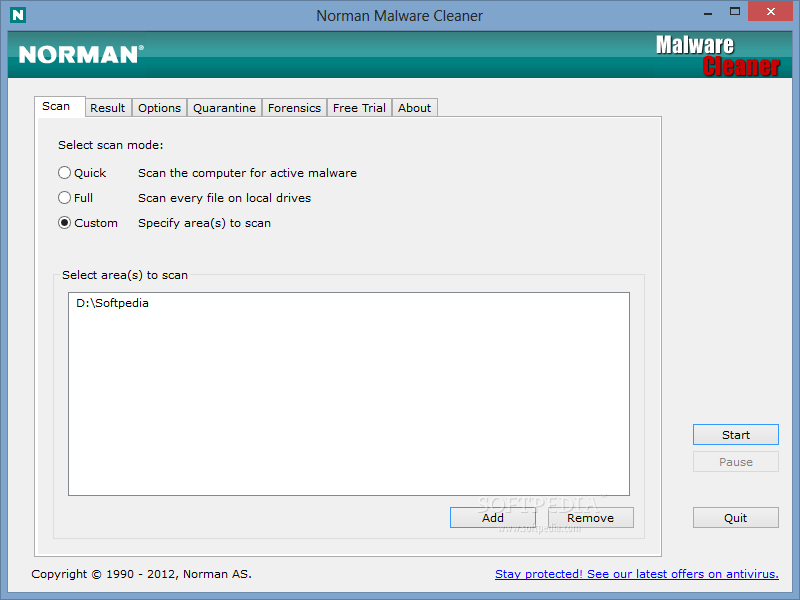
Norman Malware Cleaner is one of the new apps in the security software industry, promising to keep computers around the world away from malware and other dangerous files that could compromise user's safety.

Although it comes packed as an over 130 MB file, Norman Malware Cleaner has adopted a different approach. 

This software doesn't have an installer, since viruses are now attempting to block installation of antiviruses and security tools, so it's being delivered as an executable file, which means you only need to double click the file to launch the app.

The interface is pretty basic and that's a very good thing, since the purpose of the whole software is to find and delete infections. 

There are four scanning modes, quick, normal, full and custom, so choose the one that fits you best. Of course, the full mode will need much more time, while the quick one is better for a quick analysis of the computer.

During our testing, scanning the computer in quick mode took around 2 minutes, while the full option needed around 20 minutes to complete. Still, the latter was a bit more efficient as it checked every single file on the computer for malicious data.

There are multiple options available in the dedicated tab, giving you the power to enable verbose logging, quarantine, archive unpacking, memory scanning, FakeAV scanning, rootkit cleaning, multithreading, detection of potentially unwanted programs and Sandbox.

The Quarantine tab provides a quick look over the suspicious files detected by Norman Malware Cleaner, with dedicated tools to restore or delete the files permanently at the bottom of the main window.

Norman Malware Cleaner is no replacement for a fully fledged antivirus, but if cleaning your computer of infected files wasn't possible with the existing tools, this one is really worth a chance.


Description

  • Easy to install and runhttp://www.softpedia.com/dyn-postdownload.php?p=73672&t=0&i=1
  • Detect and Remove malware (viruses, Rootkit’s, FakeAV, worms and more)
  • Utilize advanced Anti-Rootkit technology
  • Quarantine module to process the detected files
  • Deep scan and cleaning including Norman patented Norman SandBox technology
  • Supports Quick- and Deep Scan mode
  • New command line function for better tailor scanning across several machines (businesses)
  • Daily signature updates available

VirIT eXplorer Lite 7.6.0


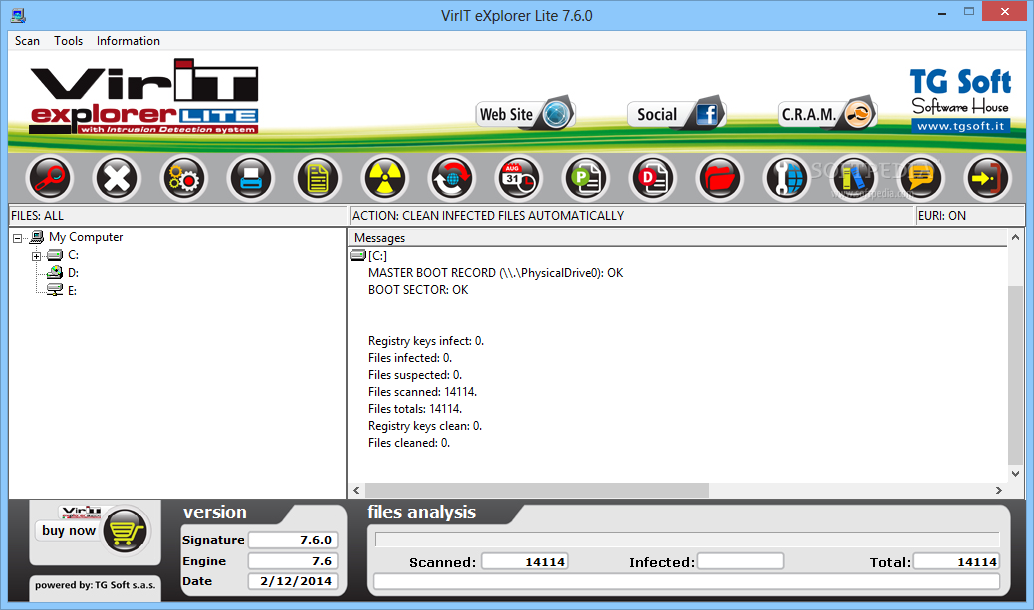
VirIT eXplorer Lite is an all-in-one security software solution that promises to defend your computer against all types of threats, be they viruses, spyware, worms, Trojan horses, BHO and adware.

The application doesn't look like a traditional antivirus product, as it has a rather simple interface showing you the objects that are scanned in real-time.

Everything's pretty basic in VirIT eXplorer Lite, but in case you may need some help, there's a major problem. Although the program includes a help file as well, it is not available in English, so searching the web seems to be the only viable solution.

Not to mention that some of the features included in the app are only available in Italian, such as the Macro Virus Analyser that by the way returned an error during our test.

There's a scheduler as well to schedule scans on a specific date at a given time, but also a process manager and a dedicated tool to repair Windows and Internet Explorer problems caused by viruses.

The “Options” screen is just minimal and comprises just a few settings that let you enable or disable VirIT eXplorer Lite Monitor, Scan Mail or Personal Firewall.

Scanning goes pretty fast, while the computer resource usage is moderate, so VirIT eXplorer Lite can also be installed on older machines as well.http://www.softpedia.com/dyn-postdownload.php?p=19582&t=0&i=1

All in all, VirIT eXplorer Lite is still far from what we expect from a powerful antivirus product, with a lot of improvements to be done in some key areas. Not to mention that users may find it pretty expensive, as its price is pretty close to the one of five-star products in this particular software category.

Download Here