Showing posts with label Windows Widgets. Show all posts

Thursday, March 6, 2014

MyPapala

A Yahoo widget featuring Tuzii

MyPapala is a fun widget that displays Tuzii, and animated character, running on your desktop.
So if you like Tuzii, you must enjoy this!
Requirements:
MyPapala is a fun widget that displays Tuzii, and animated character, running on your desktop
Homepage

Download Here

Quick Lottery Picker

Small and non-obtrusive Yahoo! gadget which was designed in order to help you quickly pick random numbers for any type of lottery

Written by Madalina Boboc

Quick Lottery Picker is a tiny software tool, built for Yahoo! Widgets, so as to generate random numbers, to serve as inspiration for the upcoming lottery.

The interface encompasses a minimal and user-friendly design, and thus allows anybody to find their way around it, without facing any problems. Aside from that, it is fairly unobtrusive, seeing that it does not appear in the taskbar or system tray, and can be closed with a single click.

This program enables you to draw a maximum of twelve balls from 99 numbers, and these parameters can be easily controlled with the help of the built-in arrows. Once you have set up these configurations, you simply have to click the “Go” button and, in a matter of seconds, the results will be displayed. You should also know it is possible to sort the numbers in an ascending manner.

Right-clicking the tool’s frame brings up a context menu which enables you to view information about the developers, close or hide it and access the settings panel.

The latter lets you force the widget to always stay on top of other programs, ignore all mouse events, prevent dragging and adjust the opacity levels with the help of a scroll bar (from 20% up to 100%).

All in all, Quick Lottery Picker proves to be a pretty decent piece of software, which does not hinder the computer’s performance, as it requires low CPU and RAM to work properly. It has a good response time and an intuitive environment. Nevertheless, an update would be greatly beneficial.


Requirements:


Quick Lottery Picker allows you to choose the lottery type and get random numbers for your inspiration
Homepage

Download Here

Quick PK Test

Test your psychokinetic abilities with this fun widget

Quick PK Test allows you to test your psychokinetic abilities by simply rolling the dice and trying to get as many sixes as possible.
The interface is simple. All you have to do is press start and hope for a six roll.
Requirements:
Quick PK Test allows you to test your psychokinetic abilities by simply rolling the dice

Homepage

Download Here

Quick ESP Test

An interactive Yahoo! gadget that helps you test your guessing abilities using Zener cards, while running on low system resources

Written by Ana Marculescu

Quick ESP Test is a lightweight Yahoo! widget built specifically for helping you test your extra-sensory perception using Zener cards.

It boasts a clean and intuitive layout that allows you to perform most operations with just a few clicks.

The gadget lets you select one of the Zener cards, namely a circle, Greek cross, three vertical wavy lines, square, or a star. You are required to guess nine cards from a total of 25 hits.

What’s more, Quick ESP Test keeps the score and displays the number of correct hits. On the downside, there is no support for exporting your results to a file.

Other options offered by the Yahoo! environment give you the possibility to prevent the windows from being dragged, set the opacity level, and ignore mouse events.

You can also make the gadget stay on top of other applications, and this proves to pretty useful, especially when dealing with multiple tools at the same time. What’s more, you can hide or close the widget, and move it to any area of the screen.

Since it doesn’t comprise any configuration settings of its own, even rookies can master the process with just a few clicks.

During our testing we have noticed that Quick ESP Test carries out a task very quickly, and no errors showed up throughout the entire process. As it would be expected from such a small utility, it remains light on system resources, so it doesn’t burden the overall performance of the computer, nor interfere with other programs’ functionality.

To sum things up, Quick ESP Test proves to be a simple-to-use desktop enhancement utility that helps you test your guessing abilities.


Requirements:

In the main user interface of Quick ESP Test you will find the instructions for the test
After starting the test, Quick ESP Test will display the number of correct and total hits
Homepage

Download Here

Game Machine

An online games desktop browser


Game Machine enables you to immediately play the latest online games as soon as they are released.

Browse through different game categories, play great online games from action to puzzle games and save the best games in your personal favourites.
Requirements:
What's New in This Release:
  • Different game categories
  • Add to favorites
  • Remove from favorites
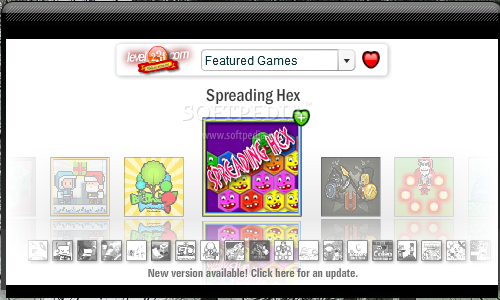
From the main user interface of Game Machine you can select the game you want to play and will be immediately redirected to the game's web-page

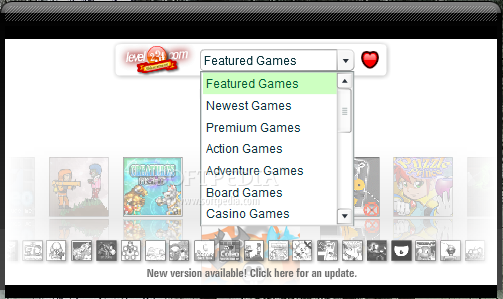
Choose between featured, newest, premium, action, board or casino games by accessing this menu
Homepage

Download Here

Wednesday, March 5, 2014

Hulu Tracker

Hulu Tracker is a sidebar gadget that enables you to search for videos on Hulu.com. The application also allows you to view the latest videos, TV shows and movies.

You can even use Hulu Tracker to watch videos from Hulu.com! Simply write the text to search for and the gadget will display a list of all the available videos, enabling you to open them in your browser.


Hulu Tracker is a sidebar gadget that enables you to search for videos on Hulu.com
 
You can view the recently added and the most popular videos, shows and movies

 
The Links window offers you access to the latest TV shows, movies and enables you to load the Hulu website


 Homepage

 Download Here

YouTube video player

An efficient and easy to use software solution that lets you listen to your favorite YouTube music, without needing a web browser

Written by Marina Dan 


YouTube video player is a simple and user-friendly application designed to provide you with access to your favorite YouTube videos, right from your desktop.

This piece of software evidently requires an Internet connection in order to work, but other than that, it is quite easy to use. All you need to do is input the keyword for your search, be it the song name or the artist, then press the 'Search' button or the 'Enter' key.

YouTube video player will return the found items, in the order you choose, as it offers the same criteria for displaying results as YouTube. As such, you can view the 'Recently Added' videos, or the 'Top Rated', 'Most Discussed Today', 'Most Viewed Today' and several others.

The program allows you to listen to music, as well as watch the video in a small window. Unfortunately, you cannot view it in full screen or in other quality.

The utility provides you with two buttons that you can use to play the previous or the next song in the list. However, it cannot render YouTube playlists nor can it move on to the next item from your search results, so you have to manually pick a new song or replay the current one.

YouTube video player can launch automatically at Windows startup and it can run minimized in the notification area, thus not interfering with your regular tasks and activities, but still allowing you to access it whenever you want. Also, you have the option of setting the application as 'Always on Top', and you can adjust its opacity levels, so it can be more or less transparent on your screen.

While YouTube video player offers several interesting options and benefits, enabling you to listen and watch your favorite music without having to use a web browser, it could use some improvement in what concerns its ability to continuously play YouTube songs.

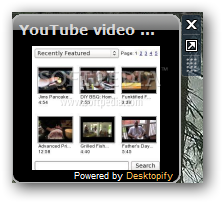
YouTube video player provides users with a useful Windows gadget which allows them to listen to their favorite music from their desktop
After you expand the gadget, you have the possibility to search for the video you are interested in and listen to it
From the right-click menu you are able to change to gadget's size and opacity according to your needs
Homepage

Download Here

Reuters Entertainment Video


Reuters Entertainment Video provides users with an easy to use Windows gadget which allows them to view the most interesting and entertaining news and video clips.

With Reuters Entertainment Video you don't have to browse the Internet anymore. You can simply access this useful gadget and view the latest video trailers and news from your desktop.
Requirements:
  • Internet Connection
With Reuters Entertainment Video you can view the most interesting and recent video clips

The context menu enables you to modify the gadget's size from small to large
Homepage

Download Here

Stream Portal

This gadget provides access to a large collection of radio and television streams which enables you to listen or watch them with minimum effort

Written by Sorin Cirneala

Stream Portal is a handy tool for the users who want to access radio streams without using a media player or web browser. It provides you with a simple interface and a large list of channels that can be accessed with minimum effort.

The main purpose of the widget is to let you watch TV on your desktop by integrating the stream in the Windows sidebar. Thus, you can view the video stream and switch to full screen when an interesting broadcast starts.

You can select the TV station from the list of channels which also includes a large number of online radio stations. All the list items are grouped according to the country which makes it easier to find your favorite stations.

By default, the gadget displays the entire list of streams but allows you to select the prefered languages from the Settings window. If your favorite station is not yet on the list, you can place a request on the developer’s website using the Add new channel button.

Unfortunately, the gadget size cannot be modified which forces you to maximize the player in order to understand the broadcast. You can only change the playback volume from the main interface.

If you do not have a broadband connection you might have problems with the playback on certain TV stations. However, certain channels from the list enable you to choose the stream quality in order to optimize the output.

Although Stream Portal displays ads while playing the stream, it is a viable choice especially when listening to the radio.

Stream Portal allows you to listen to music or watch TV in the widget's interface
The channel list enables you to select the radio or TV station and playback quality
From the Settings window you are able to change the skin or select the region for the channel list
Homepage

Download Here


Binary Clock

An innovative time gadget


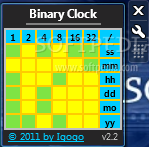
This is a clock displays the current time in binary notation. You will have the liberty to personalize Binary Clock by customizing its colors according to your preferences.

This is the way this sidebar gadget will display the current time in binary format
This window will allow you to adjust the gadget's size and to change the time format it uses

You can access this tab when you want to hide the title or the copyright information of Binary Clock

This tab will offer you the possibility to customize the colors used by Binary Clock
Homepage

Download Here

Thursday, February 27, 2014

Metric Clock

Small Windows gadget that will show current time in metric system.

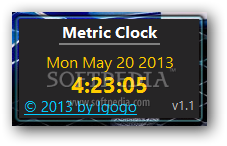
Metric Clock is a tiny widget that will constantly display the current time on your desktop.

Metric time is the measure of time interval using the metric system, which defines the second as the base unit of time, and multiple and submultiple units formed with metric prefixes, such as kiloseconds and milliseconds.

It does not define the time of day, as this is defined by various time scales, which may be based upon the metric definition of the second.

Other units of time, the minute, hour, and day, are accepted for use with the modern metric system, but are not part of it.

Metric Clock will provide users with a small Windows gadget that will show current time in metric system

The settings panel will help you quickly and easily set up the gadget to math your preferences

Users will be able to hide the date string as well as the title and the copyright from the interface of the gadget


Homepage

Download Here

Steampunk Clock Calendar

An easy to use Yahoo! widget that allows you to view the current time and date, set alarms and sound notifications with minimum effort.

Written by Elena Opris
Steampunk Clock Calendar is a lightweight app that changes the way you verify the current time. Designed for Yahoo! Widget Engine, the widget displays a steampunk clock and calendar directly on your desktop.

The interface of the tool is user-friendly. So, you can check out the current date and time, in both analog and digital format.

By accessing the 'Widget Preferences' area found in the right-click menu, you can enable an alarm and configure settings for the digital clock when it comes to the clock type, counter reset movement and counter reset time.

The analog clock's pendulum can be set to swing, while the clock's size may be selected between large, medium and small. Additionally, you can enable chimes and ticking sounds, as well as adjust the volume.

Thanks to some options provided by the Yahoo! Widget Engine, you may also make the tool stay on top or below all the other windows, ignore mouse events and prevent dragging. Last but not least, you can adjust the frame's opacity level between 20% and 100%.

The lightweight and simple-to-use utility barely leaves a mark on the computer's resources, since it uses a low amount of CPU and system memory. It has a good response time and didn't cause the operating system to freeze, crash or pop up error dialogs during our evaluation.
  • ability to properly resize the clock
  • a new day of the week indicator
  • the slider animation is much slicker
  • the slider can now be operated with your mouse scroll wheel
  • reduced cpu usage overall
  • lower cpu required by the pendulum swing action
  • many bugs fixed,
  • slicker operation in general
  • standard 12 hour clock face
  • a right click menu with plenty of options and links,
  • more documentation
  • more back end preferences to configure and play with
  • some of the graphics have also been improved upon


The Steampunk Clock Calendar allows you to view the current data and time on your desktop
You can change the back screen toggle and access other settings in this window

The Alarm tab enables you to quickly silence the alarm when you want to disable these features


Homepage

Download Here