Showing posts with label System Tools. Show all posts
Friday, March 28, 2014
VirtualBox
Virtualization software
VirtualBox is an Open Source virtualization software that enables you to run one or more operating systems within a virtual machine while running Windows. The program comes with an easy to use interface and step by step wizards that allow you to create your first VM within a matter of minutes. VirtualBox fully supports shared folder for easy data exchange between hosts and guests, as well as Remote Desktop Protocol (RDP), Virtual USB Controllers and USB over RDP.Download Here
Monday, March 3, 2014
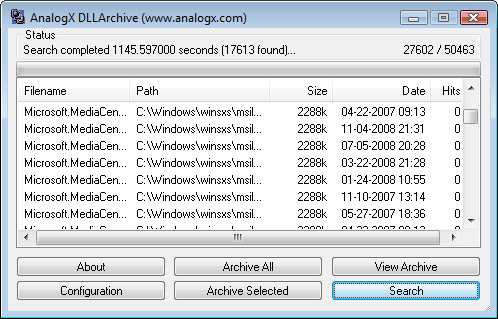
DLL Archive
Everyone has uninstalled programs at one point or another, just to be
presented with that wonderful dialog asking whether or not we want to
delete some 'shared' Windows resource... Do we? Does something else use
that DLL file it's asking about? Help!!! That's where AnalogX DLL
Archive comes in - it searches through all the files on your system and
lets you know if any of them contain references to the DLL's in
question!
AnalogX DLL Archive is super-simple to use, just click search and let it do its thing - once done, you'll be presented with a list of all the DLL's that don't have references in the system! Then just select which ones you think aren't necessary anymore and archive them - it's that simple! Make a mistake? No problem, restoring DLL's from the archive is just as simple - nothing is deleted until YOU delete it.
DLL Archive works on all versions of Windows, from Window 95 to Windows 7 and everything inbetween (including XP, Vista, Win2k, etc). If you have a general question related to any of the programs on the site, or would like some additional info related to the downloads in general, then check out the downloads FAQ.
AnalogX DLL Archive is super-simple to use, just click search and let it do its thing - once done, you'll be presented with a list of all the DLL's that don't have references in the system! Then just select which ones you think aren't necessary anymore and archive them - it's that simple! Make a mistake? No problem, restoring DLL's from the archive is just as simple - nothing is deleted until YOU delete it.
DLL Archive works on all versions of Windows, from Window 95 to Windows 7 and everything inbetween (including XP, Vista, Win2k, etc). If you have a general question related to any of the programs on the site, or would like some additional info related to the downloads in general, then check out the downloads FAQ.
| Main dialog |
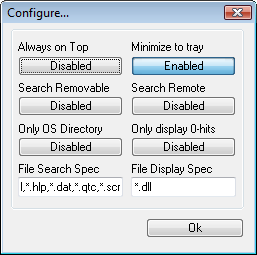
| Configuration dialog |
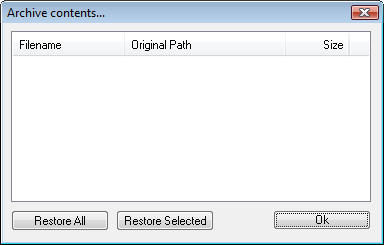
| Archive dialog |
Download Here
BanishCD
One of the best ways to make Windows more convenient is to copy the CAB
files from the CD onto your harddrive, so whenever you install any new
hardware, you don't need to put the CD in your system. Unfortunately,
Windows still ASKS for the CD, and you need to point it to where you
copied the CAB files to, until now...
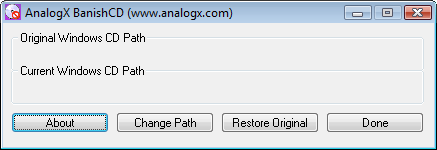
AnalogX BanishCD is a small utility that allows you to change the path that Windows will look for the CAB files. Normally, the only way this could be done would be to modify the registry manually, which is a very tricky process, and if you make a mistake it can be hard to repair. With BanishCD, you can quickly browse through your system and select the path, and just in case you make a mistake it will store the original path!
The original concept for this program came from The Screen Savers on ZDTV, which has a whole host of tips and tricks for tweaking your Windows system.
BanishCD works on all versions of Windows, from Window 95 to Windows 7 and everything inbetween (including XP, Vista, Win2k, etc). If you have a general question related to any of the programs on the site, or would like some additional info related to the downloads in general, then check out the downloads FAQ.
AnalogX BanishCD is a small utility that allows you to change the path that Windows will look for the CAB files. Normally, the only way this could be done would be to modify the registry manually, which is a very tricky process, and if you make a mistake it can be hard to repair. With BanishCD, you can quickly browse through your system and select the path, and just in case you make a mistake it will store the original path!
The original concept for this program came from The Screen Savers on ZDTV, which has a whole host of tips and tricks for tweaking your Windows system.
BanishCD works on all versions of Windows, from Window 95 to Windows 7 and everything inbetween (including XP, Vista, Win2k, etc). If you have a general question related to any of the programs on the site, or would like some additional info related to the downloads in general, then check out the downloads FAQ.
| Main dialog |
Download Here
DHCP Fix
Windows is a very 'open' system; not open in the sense of Microsoft
giving people access to proprietary information, but open in the sense
that the system is very trusting of other systems. When your computer is
at home, not talking to anyone else, then that's fine; but once you're
on the big bad internet, some people like to make their computers lie to
yours, and that's just not right...
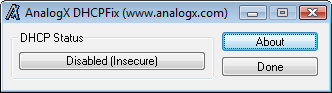
AnalogX DHCP Fix is just a simple program that closes a security hole in Windows 95/98/2000 that can make it possible for another computer to monitor every piece of information that comes and goes from it. The program will allow you to enable or disable the registry entry that closes this particular hole.
It's very easy to do and will only take you a couple seconds to once more bring a calming sense of security to your computer... Until the next hole is found :). The security hole was originally detailed by L0pht Heavy Industries , but I heard about it from The Screen Savers on ZDTV, so if you'd like more information about this problem, check out these sites.
If you have a general question related to any of the programs on the site, or would like some additional info related to the downloads in general, then check out the downloads FAQ.
AnalogX DHCP Fix is just a simple program that closes a security hole in Windows 95/98/2000 that can make it possible for another computer to monitor every piece of information that comes and goes from it. The program will allow you to enable or disable the registry entry that closes this particular hole.
It's very easy to do and will only take you a couple seconds to once more bring a calming sense of security to your computer... Until the next hole is found :). The security hole was originally detailed by L0pht Heavy Industries , but I heard about it from The Screen Savers on ZDTV, so if you'd like more information about this problem, check out these sites.
If you have a general question related to any of the programs on the site, or would like some additional info related to the downloads in general, then check out the downloads FAQ.
| Main dialog |
Download Here
AutoTab
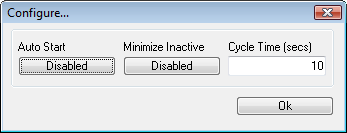
This is one of the most off-the-wall applications that you'll find on
the site - AnalogX AutoTab! Just what does it do - simple, it switches
between active applications every couple of seconds... Perfect for
tradeshow displays or other times when you would like your computer to
switch through a variety of programs in an automated fashion. Just
another bizarre application conceived by the guys at The Screen Savers !
AutoTab works on all versions of Windows, from Window 95 to Windows 7 and everything inbetween (including XP, Vista, Win2k, etc). If you have a general question related to any of the programs on the site, or would like some additional info related to the downloads in general, then check out the downloads FAQ.
| Configuration dialog |
Download Here
Capture
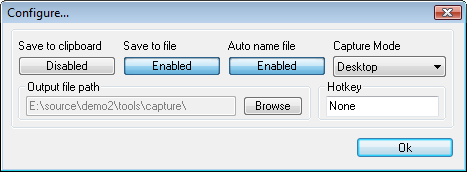
Capture is a quick-and-easy screen capture utility for Windows (and
NT), which allows you to capture the entire screen, at any color depth
and resolution, and save it into a Bitmap file for editing. If you are
interested in only capturing one window, you can select to capture the
active application window only, to save time editing screenshots!
Capture runs on the Windows Tray (the lower right corner), and takes a
screen capture every time you left click on the picture of a camera
(please cut me some slack on the icon, I'm a musician, not an artist,
and it was late), and a bitmap will be saved into the directory Capture
is running from. You can take as many captures as you want, limited only
by your imagination, and harddrive space. To exit Capture, just right
click on it, and select 'Exit'; it's just that simple.
Capture works on all versions of Windows, from Window 95 to Windows 7 and everything inbetween (including XP, Vista, Win2k, etc). If you have a general question related to any of the programs on the site, or would like some additional info related to the downloads in general, then check out the downloads FAQ.
| Configuration dialog |
Download Here
MaxMem
Have you ever noticed how your computer always seems to run better
after rebooting? Do you wish it could be that peppy all day? Well, now
it can be with a little help from AnalogX MaxMem!
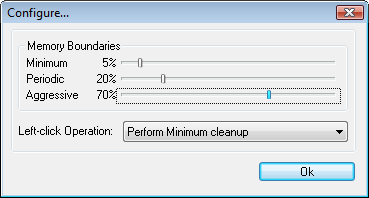
AnalogX MaxMem is a realtime physical memory management program that automatically ensures that you always have as much physical memory available as possible. It does this by allowing you to set minimum amounts of memory to be made available under certain circumstance, and then passively monitoring how much system resources are being used. It runs in the system tray, and also shows you exactly how much memory you have available, plus graphs how you've been using memory over the last 60 seconds!
MaxMem works on all versions of Windows, from Window 95 to Windows 7 and everything inbetween (including XP, Vista, Win2k, etc). If you have a general question related to any of the programs on the site, or would like some additional info related to the downloads in general, then check out the downloads FAQ.
AnalogX MaxMem is a realtime physical memory management program that automatically ensures that you always have as much physical memory available as possible. It does this by allowing you to set minimum amounts of memory to be made available under certain circumstance, and then passively monitoring how much system resources are being used. It runs in the system tray, and also shows you exactly how much memory you have available, plus graphs how you've been using memory over the last 60 seconds!
MaxMem works on all versions of Windows, from Window 95 to Windows 7 and everything inbetween (including XP, Vista, Win2k, etc). If you have a general question related to any of the programs on the site, or would like some additional info related to the downloads in general, then check out the downloads FAQ.
Configuration dialog
|
Download Here
Script Defender
I'm sure that by now everyone has heard about email viruses; most
people probably have either experienced one themselves or know someone
who has. The latest batch of viruses have become more adept than ever at
getting people to execute them unintentionally - that's where AnalogX
Script Defender comes in!
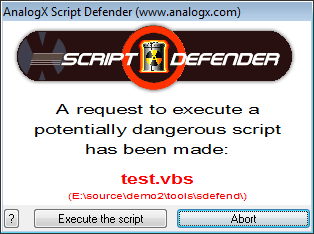
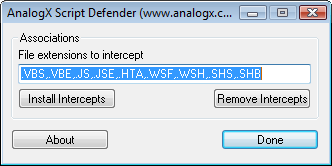
AnalogX Script Defender will intercept any request to execute the most common scripting types used in virus attacks, such as Visual Basic Scripting (.VBS), Java Script (.JS), etc., and can even be configured to intercept new script extensions as needed! It's very simple to use and helps to ensure that you do not inadvertently run a script no matter what email program you use, or even if you get it via another method.
Script Defender works on all versions of Windows, from Window 95 to Windows 7 and everything inbetween (including XP, Vista, Win2k, etc). If you have a general question related to any of the programs on the site, or would like some additional info related to the downloads in general, then check out the downloads FAQ.
AnalogX Script Defender will intercept any request to execute the most common scripting types used in virus attacks, such as Visual Basic Scripting (.VBS), Java Script (.JS), etc., and can even be configured to intercept new script extensions as needed! It's very simple to use and helps to ensure that you do not inadvertently run a script no matter what email program you use, or even if you get it via another method.
Script Defender works on all versions of Windows, from Window 95 to Windows 7 and everything inbetween (including XP, Vista, Win2k, etc). If you have a general question related to any of the programs on the site, or would like some additional info related to the downloads in general, then check out the downloads FAQ.
| Alert dialog |
| Configuration dialog |
Download Here
CacheBooster
It's a pretty safe bet that everyone wants to squeeze every ounce of
performance out of their machine, whether it's the lastest and greatest
one million mhz superchip or an 8088. Two of the bigger bottlenecks are
harddisk performance and memory management; we've already covered memory
management with MaxMem, so how about harddisk...
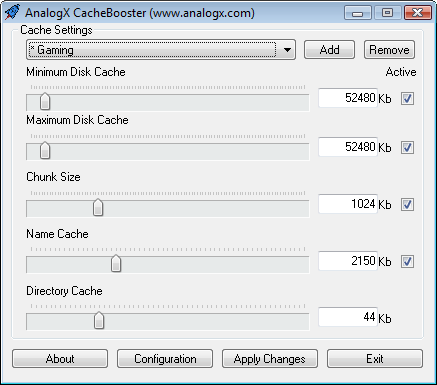
AnalogX CacheBooster allows you to tweak your harddisk caching to help achieve the best possible performance from your system. Of course, different types of programs require different settings - CacheBooster comes configured with many of the most common uses which will automatically reconfigure themselves for your system, plus you can even add your own custom configurations!
If you have a general question related to any of the programs on the site, or would like some additional info related to the downloads in general, then check out the downloads FAQ.
AnalogX CacheBooster allows you to tweak your harddisk caching to help achieve the best possible performance from your system. Of course, different types of programs require different settings - CacheBooster comes configured with many of the most common uses which will automatically reconfigure themselves for your system, plus you can even add your own custom configurations!
If you have a general question related to any of the programs on the site, or would like some additional info related to the downloads in general, then check out the downloads FAQ.
| Main dialog |
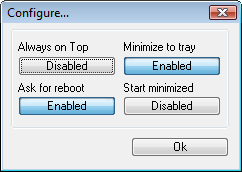
| Configuration dialog |
Download Here
TSDropCopy
Terminal Services is one of the best features of Windows 2000,
especially for managing remote servers. Unfortunately, one of the few
features it lacks is the ability to easily copy files between the client
and server. That is, until AnalogX TSDropCopy!
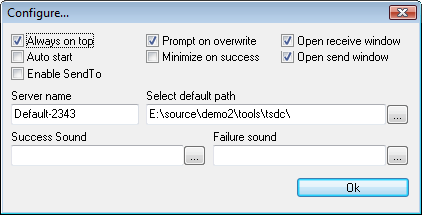
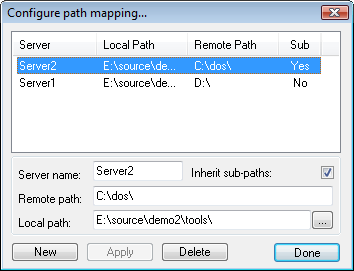
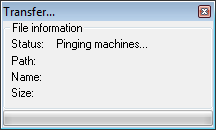
AnalogX TSDropCopy is a simple to use application that when run on both client and server allows files to be transferred between both machines quickly and easily. Simply drop the file onto the transfer window, or use the SendTo right-click menu from the explorer and let TSDropCopy do the rest. It also has the ability to map different drives paths between different servers and clients, making it simple to move files without any hassles. So if you run Terminal Services, then you NEED TSDropCopy!
It's worth noting that Terminal Services (RDC) now supports mounting remote drives and copying files, so this is really supplied for people who can't move to the latest versions for some reason.
TSDropCopy works on all versions of Windows, from Window 95 to Windows 7 and everything inbetween (including XP, Vista, Win2k, etc). If you have a general question related to any of the programs on the site, or would like some additional info related to the downloads in general, then check out the downloads FAQ.
AnalogX TSDropCopy is a simple to use application that when run on both client and server allows files to be transferred between both machines quickly and easily. Simply drop the file onto the transfer window, or use the SendTo right-click menu from the explorer and let TSDropCopy do the rest. It also has the ability to map different drives paths between different servers and clients, making it simple to move files without any hassles. So if you run Terminal Services, then you NEED TSDropCopy!
It's worth noting that Terminal Services (RDC) now supports mounting remote drives and copying files, so this is really supplied for people who can't move to the latest versions for some reason.
TSDropCopy works on all versions of Windows, from Window 95 to Windows 7 and everything inbetween (including XP, Vista, Win2k, etc). If you have a general question related to any of the programs on the site, or would like some additional info related to the downloads in general, then check out the downloads FAQ.
| Configuration dialog |
Path mapping dialog
|
| Transfer window |
Download Here
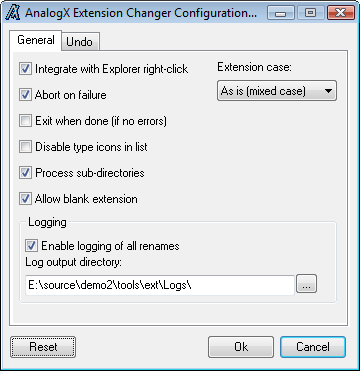
Extension Changer
If you've ever found yourself with a directory full of files with the
wrong extension, then AnalogX Extension Changer is for you! It operates
both as a standalone application, and integrates into the Windows
Explorer, making it easier than ever to rename everything from single
files to entire directory trees. Exchange Changer also features an undo
feature which allows you to reverse any batch renames it does.
Extension Changer works on all versions of Windows, from Window 95 to Windows 7 and everything inbetween (including XP, Vista, Win2k, etc). If you have a general question related to any of the programs on the site, or would like some additional info related to the downloads in general, then check out the downloads FAQ.
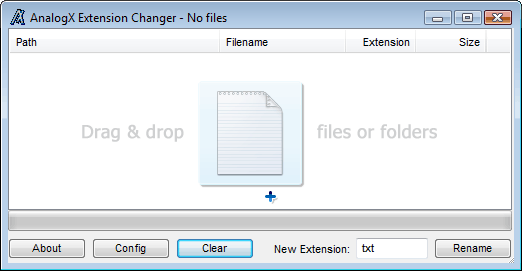
| Main dialog |
| Configuration dialog |
Download Here
Thursday, February 20, 2014
DUMo
A user-friendly and intuitive software solution that can help you get details about the drivers currently installed on your computer
Written by Giorgiana Arghire.
If you want to make sure your hardware
components will not crash down while you are working on your PC, you
need to check their drivers and ensure that you have their latest
editions installed on your computer. DUMo is a user-friendly application
that you can rely on whenever you want to examine the drivers on your
PC.
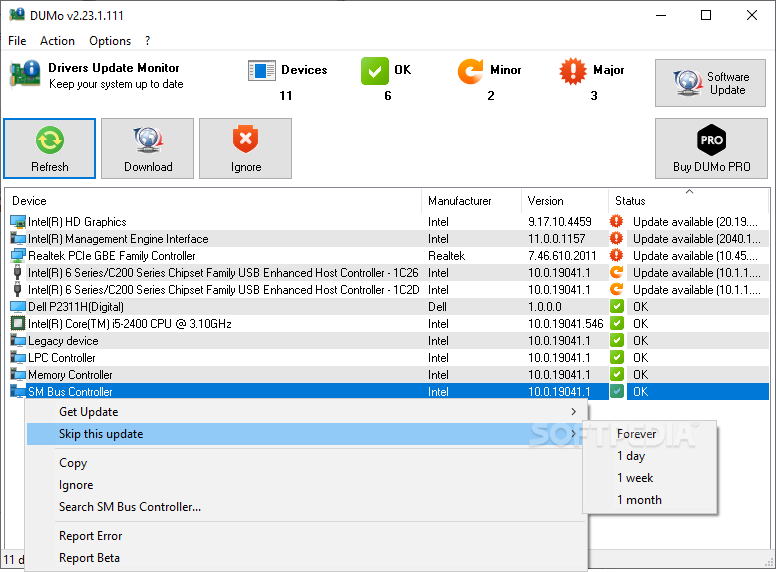
DUMo stands for Drivers Update Monitor and as soon as you run it, it automatically scans the host system and identifies all the installed drivers.
In addition to the device associated to the driver, the application also displays the manufacturer’s name and the complete version number.
Double-clicking an entry takes you to a dedicated webpage where you can view the latest version number of the driver so you can compare it to your own. If your driver is old, you can update it by browsing the web for the latest package and install it on your PC.
Unfortunately, you will need to do the searching yourself, as the application does not provide you with the possibility to automatically download and install the newest driver. So if you are a novice who is not very familiarized with searching for technical information on the Internet, you might want to steer clear of DUMo.
Additionally, this application also displays the current CPU and RAM usage levels, and when they get too high, you need to terminate some processes or close some applications otherwise your PC is very likely to freeze or crash.
To wrap it up, DUMo can offer you a comprehensive list of all the drivers installed on your computer so as to allow you to look for the newest version on the web. However, this process is not automated and this makes the app more suitable for PC experts than for beginners.
Homepage
DUMo stands for Drivers Update Monitor and as soon as you run it, it automatically scans the host system and identifies all the installed drivers.
In addition to the device associated to the driver, the application also displays the manufacturer’s name and the complete version number.
Double-clicking an entry takes you to a dedicated webpage where you can view the latest version number of the driver so you can compare it to your own. If your driver is old, you can update it by browsing the web for the latest package and install it on your PC.
Unfortunately, you will need to do the searching yourself, as the application does not provide you with the possibility to automatically download and install the newest driver. So if you are a novice who is not very familiarized with searching for technical information on the Internet, you might want to steer clear of DUMo.
Additionally, this application also displays the current CPU and RAM usage levels, and when they get too high, you need to terminate some processes or close some applications otherwise your PC is very likely to freeze or crash.
To wrap it up, DUMo can offer you a comprehensive list of all the drivers installed on your computer so as to allow you to look for the newest version on the web. However, this process is not automated and this makes the app more suitable for PC experts than for beginners.
| The main window of DUMo enables users to explore all the drivers installed on their computers |
Download Here
Computer Specs
An intuitive and user-friendly application whose main purpose is to provide a full report on the hardware components of your computer
Written by Andreea Matei on February 20th, 2014
Computer Specs is a small, yet
efficient application that serves to scan your computer and to fetch a
detailed report of its hardware specifications.
Although there’s no shortage of such utilities on the software market, Computer Specs provides a simpler approach compared to similar software and gathers reports that are easier to interpret.
Clean and intuitive interface
Computer Specs is wrapped inside a minimalistic and straightforward interface divided into several sections with suggestive titles that correspond to a specific piece of software (such as HDD, memory, motherboard and so on). This arrangement of functions allows it to provide an organized overview of the system resources.
Comprehensive system reports
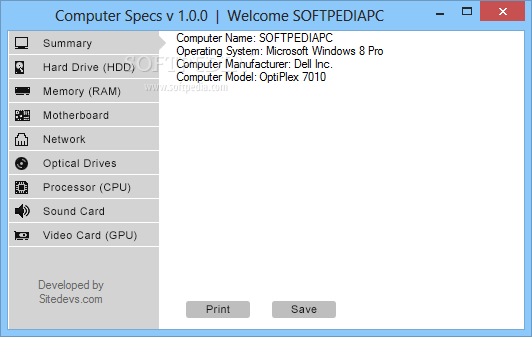
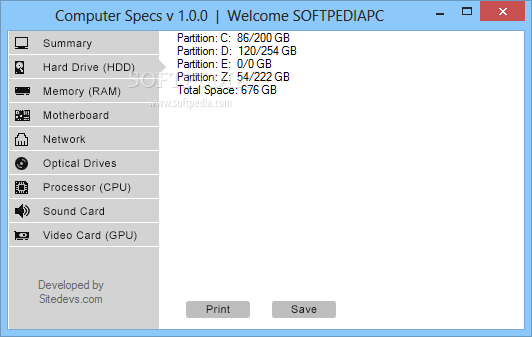
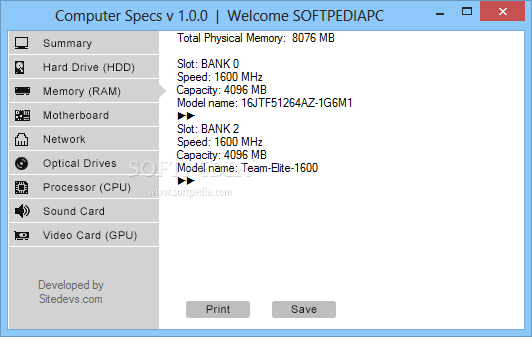
First and foremost, a summary of the hardware is displayed, with details such as OS, manufacturer and model. This is followed by reports on the hard drive (where you can view the space allocation for your partitions), RAM configuration, motherboard details, network devices, optical drives (if any).
You can also view processor parameters (such as model, number of cores and clock speed), as well as information on the sound and video devices that have been detected by the application.
Print or export reports
The information gathered by the program can be saved locally to a text file or sent directly to the printer. On the downside, it can perform these actions separately for each section, therefore you cannot process the whole report.
Simple way to gather information about your system
Computer Specs comes across as a user-oriented application that allows you to take a peek under the hood of your system in a comfortable manner. Reports are easy to understand, which makes it fit for all audiences.
Homepage
Although there’s no shortage of such utilities on the software market, Computer Specs provides a simpler approach compared to similar software and gathers reports that are easier to interpret.
Clean and intuitive interface
Computer Specs is wrapped inside a minimalistic and straightforward interface divided into several sections with suggestive titles that correspond to a specific piece of software (such as HDD, memory, motherboard and so on). This arrangement of functions allows it to provide an organized overview of the system resources.
Comprehensive system reports
First and foremost, a summary of the hardware is displayed, with details such as OS, manufacturer and model. This is followed by reports on the hard drive (where you can view the space allocation for your partitions), RAM configuration, motherboard details, network devices, optical drives (if any).
You can also view processor parameters (such as model, number of cores and clock speed), as well as information on the sound and video devices that have been detected by the application.
Print or export reports
The information gathered by the program can be saved locally to a text file or sent directly to the printer. On the downside, it can perform these actions separately for each section, therefore you cannot process the whole report.
Simple way to gather information about your system
Computer Specs comes across as a user-oriented application that allows you to take a peek under the hood of your system in a comfortable manner. Reports are easy to understand, which makes it fit for all audiences.
| Computer Specs provides hardware reports that are easy to interpret. |
| Computer Specs scans our hard drive and provides a summary of existent partitions. |
| Computer Specs also fetches information related to the physical memory present on the system. |
Homepage
Download Here
Wise Care 365 Pro
Wise Care 365 is a bundle of important registry, disk, and other system
utilities for your PC. Easy to use and effective, Wise Care 365 is the
best solution to improve your PC's performance. Get Wise Care 365 and
your computer will never run slow again!
What can Wise Care 365 do?
• Clean up, defragment and optimize the Windows Registry
• Defragment and free up space on your hard disk
• Protect your privacy by erasing personal tracking data
• Recover lost files
• Hide important files or folders
• Prevent unauthorized use of personal applications
• Auto shut down your PC
• Free up Memory to boost game and enterprise software performance
• Simple "One Click Tune-up" option will optimize your PC
Homepage
| Wise Care 365 Pro | 8.2 Mb |
What can Wise Care 365 do?
• Clean up, defragment and optimize the Windows Registry
• Defragment and free up space on your hard disk
• Protect your privacy by erasing personal tracking data
• Recover lost files
• Hide important files or folders
• Prevent unauthorized use of personal applications
• Auto shut down your PC
• Free up Memory to boost game and enterprise software performance
• Simple "One Click Tune-up" option will optimize your PC
Homepage
Download Links:
Wednesday, February 19, 2014
CCleaner
Probably the most popular freeware cleaner globally with over 1
billion downloads since its launch in 2003. Piriform’s CCleaner is a
quick and easy to use program which makes your computer faster, more
secure and more reliable. CCleaner removes cookies, temporary files and
various other unused data that clogs up your operating system. This
frees up valuable hard disk space allowing your system to run faster.
Removing this data also protects your anonymity meaning you can browse
online more securely. The built in Registry Cleaner fixes errors and
broken settings to make your computer more stable. The simple, intuitive
UI and rapid but powerful cleaning make CCleaner a favourite among
novices and techies alike. Professional, Network, Business and
Technician Editions of CCleaner are also available for serious users.
A Faster Computer
Browsing the internet your computer picks up a whole host of unnecessary files, cookies and history. The same thing happens when you run most programs on your computer – lots of temporary files and settings are saved. CCleaner removes these unused files and settings to free up valuable hard drive space, enabling your system to run faster. The default settings only focus on typical junk files and locations so you’re unlikely to lose important information unless you alter these. A Startup Cleaner also helps you to identify and remove unused programs running in the background when you start your computer. This makes the startup time shorter and puts less strain on your hard drive throughout use.
Less Crashes & System Errors
If you notice lots of system freezes, error messages and often experience crashes, the chances are your registry become cluttered with unused files and broken settings. CCleaner’s fully featured Registry Cleaner identifies these issues and fixes them. The registry analysis takes seconds and cleaning just a little bit longer. Prompts advise you when to save backups to avoid losing important data.
More Secure Browsing
Advertisers and websites track your behaviour online with cookies. Saved passwords, cached data and internet histories make your identity less secure. CCleaner removes these files to make your browsing experience confidential, meaning you are less likely to suffer from identity theft and/or online fraud. The military grade Drive Wiper ensures any data you want to be permanently deleted, stays deleted.
Customisable Cleaning
CCleaner Tools and Options tabs allow you to customise cleaning options to fit your needs. If you are not a savvy user, you might want to stick with the safe default settings. Advanced users can uninstall unwanted programs, select which cookies to save, customise cleaning settings and setup system monitoring.
Summary
CCleaner has earned its position at the top of the freeware cleaners offering the sort of features premium programs struggle to compete with. The clean, intuitive UI makes it one of the easiest programs to use, but don’t let its size and simplicity fool you. This is a powerful utility for improving your computers performance. Piriform’s regular update process means CCleaner is constantly improving and its popularity will continue to grow.
Browsing the internet your computer picks up a whole host of unnecessary files, cookies and history. The same thing happens when you run most programs on your computer – lots of temporary files and settings are saved. CCleaner removes these unused files and settings to free up valuable hard drive space, enabling your system to run faster. The default settings only focus on typical junk files and locations so you’re unlikely to lose important information unless you alter these. A Startup Cleaner also helps you to identify and remove unused programs running in the background when you start your computer. This makes the startup time shorter and puts less strain on your hard drive throughout use.
Less Crashes & System Errors
If you notice lots of system freezes, error messages and often experience crashes, the chances are your registry become cluttered with unused files and broken settings. CCleaner’s fully featured Registry Cleaner identifies these issues and fixes them. The registry analysis takes seconds and cleaning just a little bit longer. Prompts advise you when to save backups to avoid losing important data.
More Secure Browsing
Advertisers and websites track your behaviour online with cookies. Saved passwords, cached data and internet histories make your identity less secure. CCleaner removes these files to make your browsing experience confidential, meaning you are less likely to suffer from identity theft and/or online fraud. The military grade Drive Wiper ensures any data you want to be permanently deleted, stays deleted.
Customisable Cleaning
CCleaner Tools and Options tabs allow you to customise cleaning options to fit your needs. If you are not a savvy user, you might want to stick with the safe default settings. Advanced users can uninstall unwanted programs, select which cookies to save, customise cleaning settings and setup system monitoring.
Summary
CCleaner has earned its position at the top of the freeware cleaners offering the sort of features premium programs struggle to compete with. The clean, intuitive UI makes it one of the easiest programs to use, but don’t let its size and simplicity fool you. This is a powerful utility for improving your computers performance. Piriform’s regular update process means CCleaner is constantly improving and its popularity will continue to grow.
- Title: CCleaner 4.10.4570
- Filename: ccsetup410.exe
- File size: 4.50MB (4,721,920 bytes)
- Requirements: Windows 2000 / XP / Vista / Windows7 / XP64 / Vista64 / Windows7 64 / Windows8 / Windows8 64
- Languages: Multiple languages
- License: Freeware
- Date added: January 23, 2014
- Author: Piriform www.piriform.com
- Homepage: www.piriform.com/ccleaner
Download Here
Tuesday, February 18, 2014
Glary Utilities Pro
Glary Utilities is a collection of system tools and utilities to
fix, speed up, maintain and protect your PC. It allows you to clean
common system junk files, as well as invalid registry entries and
Internet traces (theres a plug-in support for 45+ external programs).
You can also manage and delete browser add-ons, analyze disk space usage
and find duplicate files.
Furthermore, Glary Utilities includes the options to optimize memory, find, fix, or remove broken Windows shortcuts, manage the programs that start at Windows startup and uninstall software. Other features include secure file deletion, an Empty Folder finder and more. Other features include secure file deletion, an Empty Folder finder and more. All Glary Utilities tools can be accessed through an eye-pleasing and totally simplistic interface.
- Registry Cleaner. Scan and clean up your registry to improve your systems performance.
- Shortcuts Fixer. Corrects the errors in your startmenu desktop shortcuts
- Startup Manager. Manages programs which run automatically on startup
- Memory Optimizer. Monitors and optimizes free memory in the background
- Tracks Eraser. Erases all the traces,evidences,cookies,internet history and more
- File Shredder. Erases files permanently so that no one can recover them
- Internet Explorer Assistant. Manages Internet Explorer Add-ons and restores hijacked settings
- Disk Analysis. Get details information of the desired files and folders
- Duplicate Files Finder. Searches for space-wasting and error producing duplicate files
- Empty Folders Finder. Find and remove empty folders in your windows
- Uninstall Manager. Completely uninstall programs you dont need any more
- Context Menu Manager. Manage the context-menu entries for files, folders.
Furthermore, Glary Utilities includes the options to optimize memory, find, fix, or remove broken Windows shortcuts, manage the programs that start at Windows startup and uninstall software. Other features include secure file deletion, an Empty Folder finder and more. Other features include secure file deletion, an Empty Folder finder and more. All Glary Utilities tools can be accessed through an eye-pleasing and totally simplistic interface.
| Glary Utilities Pro 4.6.0.90 | 11.69 MB |
Features:
- Disk Cleaner. Removes junk data from your disks and recovers disk space- Registry Cleaner. Scan and clean up your registry to improve your systems performance.
- Shortcuts Fixer. Corrects the errors in your startmenu desktop shortcuts
- Startup Manager. Manages programs which run automatically on startup
- Memory Optimizer. Monitors and optimizes free memory in the background
- Tracks Eraser. Erases all the traces,evidences,cookies,internet history and more
- File Shredder. Erases files permanently so that no one can recover them
- Internet Explorer Assistant. Manages Internet Explorer Add-ons and restores hijacked settings
- Disk Analysis. Get details information of the desired files and folders
- Duplicate Files Finder. Searches for space-wasting and error producing duplicate files
- Empty Folders Finder. Find and remove empty folders in your windows
- Uninstall Manager. Completely uninstall programs you dont need any more
- Context Menu Manager. Manage the context-menu entries for files, folders.
Download Here
AusLogics BoostSpeed
Auslogics BoostSpeed - the ideal solution to speed up your computer and
Internet connection. This powerful Windows optimizer will boost Internet
connections, tweak Windows to its peak performance, clean and defrag
disks and the registry. It's a great way to speed up your PC and keep it
clean and optimized. Start programs faster. Speed up computer start
time. Increase Internet speed, optimize your Internet Explorer, Firefox
and E-mail programs. Boost Speed will clean up disks and the Registry to
speed up your computer and tweak Windows to its peak performance.
Speed Up PC With BoostSpeed
Modify Windows settings, file system and services to greatly increase system performance. Increase startup and shutdown speed, disable annoying CD autorun and error reporting features. BoostSpeed will keep monitoring your system for possible optimizations and let you know if such optimizations are possible. You can also run the System Optimization Wizard to periodically optimize your PC.
Speed Up Internet
Adjust your PC for faster images, music and software downloads, increased browsing speed and reliable Internet connections. View your download speed and graphs. To gain additional performance boost you can also turn on DNS Optimization.
Block Banner Advertisements
Tired of annoying banner advertisements accompanying many web sites? Now you can eliminate advertisements and also speed up your Internet browsing with BoostSpeed Banner Killer! You can add your own web sites to the black list to block them from showing their advertisements.
Keep Disk and Registry Clean
Get rid of junk on the disks and registry of your PC. Remove hazardous and space-wasting files left by untidy programs and crashes of your system. Dramatically increase the performance of your PC by cleaning, optimizing and defragmenting local disks and registry.
Optimize Memory and Appearance
Badly written applications constantly steal memory without giving it back. That's why your PC becomes unstable with time and you have to reboot. BoostSpeed automatically frees up computer memory to gain additional performance boost. You can also manually recover memory and clipboard.
Keep your PC fast and safe
BoostSpeed will detect most of the popular "PC-slowers" - bundle-software (such as eDonkey or Kazaa) which silently download malware and spyware to your computer, taking up internet traffic and slowing down the system. This will also keep your system safe from prying eyes of spyware programs.
Boost Software Products
BoostSpeed can improve performance of different software products, including Microsoft Office, Internet browsers (such as Internet Explorer, Opera, Mozzila), E-mail clients (Outlook, The Bat), MSN Messenger, ICQ, Media Player and others.
System Optimization Tools
Greatly increase your PC startup speed with Autorun Manager, where you can disable or remove the programs which try to load up when Windows starts up. Force-uninstall unwanted software products which take up space on your computer and slow it down.
Networks Tools
Keep your connection alive while you're away, synchronize your computer clock with atomic clock over the Internet, lookup domain names and IP addresses, measure your Internet connection speed. Troubleshoot and improve your Internet connection and local network with an excellent selection of network management tools.
All scanners now include an option to select categories for scanning.
Added hints to describe various interface elements and operation progress.
Added current update status.
Improved data presentation on the statistics page.
Speed Up PC With BoostSpeed
Modify Windows settings, file system and services to greatly increase system performance. Increase startup and shutdown speed, disable annoying CD autorun and error reporting features. BoostSpeed will keep monitoring your system for possible optimizations and let you know if such optimizations are possible. You can also run the System Optimization Wizard to periodically optimize your PC.
Speed Up Internet
Adjust your PC for faster images, music and software downloads, increased browsing speed and reliable Internet connections. View your download speed and graphs. To gain additional performance boost you can also turn on DNS Optimization.
Block Banner Advertisements
Tired of annoying banner advertisements accompanying many web sites? Now you can eliminate advertisements and also speed up your Internet browsing with BoostSpeed Banner Killer! You can add your own web sites to the black list to block them from showing their advertisements.
Keep Disk and Registry Clean
Get rid of junk on the disks and registry of your PC. Remove hazardous and space-wasting files left by untidy programs and crashes of your system. Dramatically increase the performance of your PC by cleaning, optimizing and defragmenting local disks and registry.
Optimize Memory and Appearance
Badly written applications constantly steal memory without giving it back. That's why your PC becomes unstable with time and you have to reboot. BoostSpeed automatically frees up computer memory to gain additional performance boost. You can also manually recover memory and clipboard.
Keep your PC fast and safe
BoostSpeed will detect most of the popular "PC-slowers" - bundle-software (such as eDonkey or Kazaa) which silently download malware and spyware to your computer, taking up internet traffic and slowing down the system. This will also keep your system safe from prying eyes of spyware programs.
Boost Software Products
BoostSpeed can improve performance of different software products, including Microsoft Office, Internet browsers (such as Internet Explorer, Opera, Mozzila), E-mail clients (Outlook, The Bat), MSN Messenger, ICQ, Media Player and others.
System Optimization Tools
Greatly increase your PC startup speed with Autorun Manager, where you can disable or remove the programs which try to load up when Windows starts up. Force-uninstall unwanted software products which take up space on your computer and slow it down.
Networks Tools
Keep your connection alive while you're away, synchronize your computer clock with atomic clock over the Internet, lookup domain names and IP addresses, measure your Internet connection speed. Troubleshoot and improve your Internet connection and local network with an excellent selection of network management tools.
Changelog:
Registry Cleaner and Registry Defrag are included in BoostSpeed as separate tools now.All scanners now include an option to select categories for scanning.
Added hints to describe various interface elements and operation progress.
Added current update status.
Improved data presentation on the statistics page.
Download Here
Subscribe to:
Posts (Atom)