Auslogics Browser Care enables you to manage all your browser toolbars, add-ons and search settings from a single application. You can disable or remove toolbars and add-ons, change default homepage settings and manage your search providers. In addition, Browser Care also lets you clean your browsing data (History, Cookies etc.) and offers an option to reset your browser settings to their defaults. The program currently supports Internet Explorer, Firefox, and Google Chrome. A portable version comes included.
Showing posts with label Web Browser Tools. Show all posts
Showing posts with label Web Browser Tools. Show all posts
Friday, March 7, 2014
Auslogics Browser Care
manage browser toolbars and add-ons
Auslogics Browser Care enables you to manage all your browser toolbars, add-ons and search settings from a single application. You can disable or remove toolbars and add-ons, change default homepage settings and manage your search providers. In addition, Browser Care also lets you clean your browsing data (History, Cookies etc.) and offers an option to reset your browser settings to their defaults. The program currently supports Internet Explorer, Firefox, and Google Chrome. A portable version comes included.
Homepage
Auslogics Browser Care enables you to manage all your browser toolbars, add-ons and search settings from a single application. You can disable or remove toolbars and add-ons, change default homepage settings and manage your search providers. In addition, Browser Care also lets you clean your browsing data (History, Cookies etc.) and offers an option to reset your browser settings to their defaults. The program currently supports Internet Explorer, Firefox, and Google Chrome. A portable version comes included.

Sleipnir
dual-engine web browser
Sleipnir is a popular Japanese web browser that allows you to switch between Trident (Internet Explorer) and WebKit browser engines. It can automatically remember your choice of engine for each website, which makes switching engines completely transparent. Sleipnir is highly customizable and offers an integrated RSS feed reader that lets you read and manage news feed from inside a browser tab. A unique page flicking feature allows you to quickly cycle through your open tabs by holding down the right mouse button and "flicking" the page to the left or right (similar to swiping on your iPhone). You can quickly scroll pages up/down in the same manner. Sleipnir also offers optional integration with an online service that enables you to share web content with via Facebook, Twitter (etc.) and link content with your Android or iPhone device. When it comes to browser extensions, Sleipnir disappoints - there are only a handful of add-ons available.
Homepage
Sleipnir is a popular Japanese web browser that allows you to switch between Trident (Internet Explorer) and WebKit browser engines. It can automatically remember your choice of engine for each website, which makes switching engines completely transparent. Sleipnir is highly customizable and offers an integrated RSS feed reader that lets you read and manage news feed from inside a browser tab. A unique page flicking feature allows you to quickly cycle through your open tabs by holding down the right mouse button and "flicking" the page to the left or right (similar to swiping on your iPhone). You can quickly scroll pages up/down in the same manner. Sleipnir also offers optional integration with an online service that enables you to share web content with via Facebook, Twitter (etc.) and link content with your Android or iPhone device. When it comes to browser extensions, Sleipnir disappoints - there are only a handful of add-ons available.
Download Here
Maxthon
web browser Built for speed
Maxthon is a cloud oriented web browser that is built for speed and fast page load times. It offers all the standard features your would expect from a browser as well as several exclusive features like integrated cloud storage for your bookmarks, multi-engine web search and extensive customization options . Maxthon also offers a variety of unique features that are designed for a more efficient web browsing experience. These include a built-in screen capture tool, and integrated video downloader, page zoom, split screen browsing, history calendar, URL aliases and more. Other features include private browsing, integrated spell checking and form filling, the ability to run multiple browsing sessions, and much more.
Homepage
Maxthon is a cloud oriented web browser that is built for speed and fast page load times. It offers all the standard features your would expect from a browser as well as several exclusive features like integrated cloud storage for your bookmarks, multi-engine web search and extensive customization options . Maxthon also offers a variety of unique features that are designed for a more efficient web browsing experience. These include a built-in screen capture tool, and integrated video downloader, page zoom, split screen browsing, history calendar, URL aliases and more. Other features include private browsing, integrated spell checking and form filling, the ability to run multiple browsing sessions, and much more.
Download Here
Avant Browser
Customizable web browser
Avant Browser is a tabbed browser based on the Internet Explorer core. It allows you to browse multiple Web sites simultaneously, block popup windows, block Flash advertising, and offers additional mouse functions for faster navigation. Additional features include an integrated privacy cleaner that helps to remove surfing tracks, a built-in Yahoo/Google search, RSS/ATOM Reader, Popup blocking and more. Avant Browser also provides options to easily block downloads of pictures, videos, Flash, sounds and ActiveX components to further speed up page loading times. All your IE settings and Favorites are automatically available from within Avant Browser.
Homepage
Avant Browser is a tabbed browser based on the Internet Explorer core. It allows you to browse multiple Web sites simultaneously, block popup windows, block Flash advertising, and offers additional mouse functions for faster navigation. Additional features include an integrated privacy cleaner that helps to remove surfing tracks, a built-in Yahoo/Google search, RSS/ATOM Reader, Popup blocking and more. Avant Browser also provides options to easily block downloads of pictures, videos, Flash, sounds and ActiveX components to further speed up page loading times. All your IE settings and Favorites are automatically available from within Avant Browser.
Download Here
Pale Moon
optimized Firefox browser
Pale Moon is a Firefox clone that has been optimized for for Windows Operating Systems with current, high performance processors. It looks identical to the standard Firefox browser and supports Firefox extensions, themes and identities. All your existing extensions, bookmarks and settings are imported during the installation, so, except for the logo, you won`t notice any difference in functionality. What you may notice however is a difference in speed due to the optimized code which will results in faster scripting and page rendering as well as (slightly) lower memory consumptions. Pale Moon is based on the Firefox source and offers the same levels of security. It supports most Firefox features with the exception of accessibility features and parental control features which have been disabled for performance reasons.
Homepage
Pale Moon is a Firefox clone that has been optimized for for Windows Operating Systems with current, high performance processors. It looks identical to the standard Firefox browser and supports Firefox extensions, themes and identities. All your existing extensions, bookmarks and settings are imported during the installation, so, except for the logo, you won`t notice any difference in functionality. What you may notice however is a difference in speed due to the optimized code which will results in faster scripting and page rendering as well as (slightly) lower memory consumptions. Pale Moon is based on the Firefox source and offers the same levels of security. It supports most Firefox features with the exception of accessibility features and parental control features which have been disabled for performance reasons.
Homepage
Download Here
Saturday, February 22, 2014
Opera Web Browser
Written by Bogdan Popa
The latest Opera release brings forth a
completely different look for the popular web browser, which definitely
gives users a reason to tinker with its new features.
Based on Chromium and Blink (the rendering engine used by Chromium), Opera has come up with bigger guns to enter the race for the most popular web browser, as the current leading role is played between Chrome, Firefox and Internet Explorer.
At the first run of the program, we can find out the new and exciting features packed by Opera, as the address and search bar are now merged to allow multiple predictive results, while web pages can be added to the Speed Dial or Stash.
The first option enables users to seamlessly organize fast access to websites through app-like buttons, as we already know. However, Speed Dial has received some upgrades of its own, as it now lets you use a search function when dealing with numerous entries, as well as group items together.
Stash makes a note of the location, metadata and screenshot of a page, which is particularly useful when you want to pick up where you left off. This feature comprises a search function as well, and stores data into a collapsable list entry in the Start page of Opera.
Last but not least, you can check out the most popular stories at the moment from the category of your choice, via the Discover section, and filter them by location and language.
Another important aspect worth mentioning is that, although this edition can be downloaded separately from the previous one, users have the possibility of migrating their old profiles, in order to preserve data. From the technical standpoint, the web browser borrows the server-side compression technology used by Opera Mobile, also known as Off-Road mode. Mouse gestures are supported as well.
All in all, Opera has definitely stepped up its game with the latest release. It is reasonable when it comes to the CPU and RAM usage, remains stable throughout the navigation process, and features a more intuitive environment than ever, although it looks a little too much like Chrome.
Homepage
Based on Chromium and Blink (the rendering engine used by Chromium), Opera has come up with bigger guns to enter the race for the most popular web browser, as the current leading role is played between Chrome, Firefox and Internet Explorer.
At the first run of the program, we can find out the new and exciting features packed by Opera, as the address and search bar are now merged to allow multiple predictive results, while web pages can be added to the Speed Dial or Stash.
The first option enables users to seamlessly organize fast access to websites through app-like buttons, as we already know. However, Speed Dial has received some upgrades of its own, as it now lets you use a search function when dealing with numerous entries, as well as group items together.
Stash makes a note of the location, metadata and screenshot of a page, which is particularly useful when you want to pick up where you left off. This feature comprises a search function as well, and stores data into a collapsable list entry in the Start page of Opera.
Last but not least, you can check out the most popular stories at the moment from the category of your choice, via the Discover section, and filter them by location and language.
Another important aspect worth mentioning is that, although this edition can be downloaded separately from the previous one, users have the possibility of migrating their old profiles, in order to preserve data. From the technical standpoint, the web browser borrows the server-side compression technology used by Opera Mobile, also known as Off-Road mode. Mouse gestures are supported as well.
All in all, Opera has definitely stepped up its game with the latest release. It is reasonable when it comes to the CPU and RAM usage, remains stable throughout the navigation process, and features a more intuitive environment than ever, although it looks a little too much like Chrome.
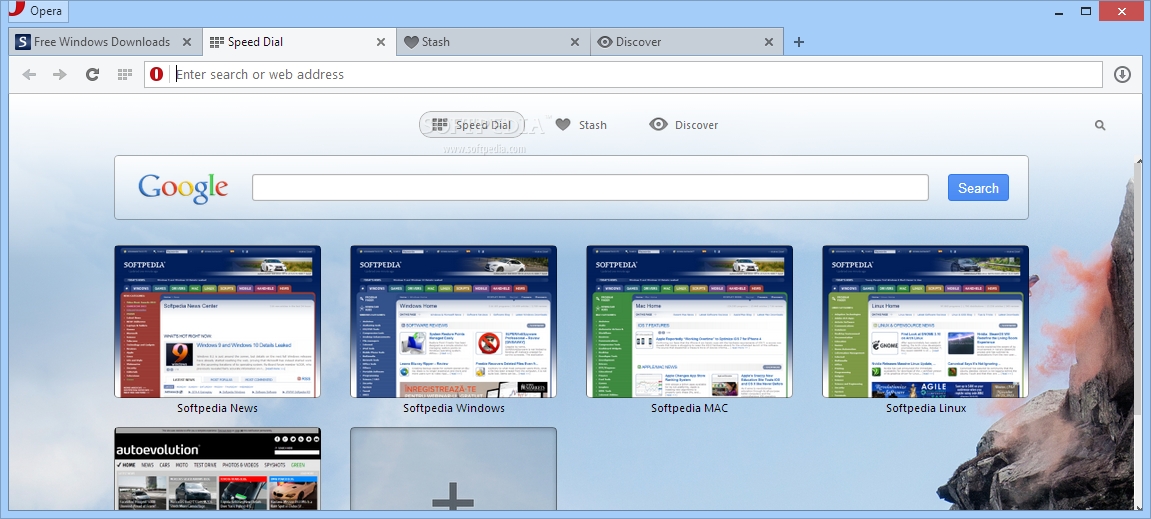 |
| The main window of Opera Web Browser is the place where you can explore the Start Dial items |
 |
| Opera Web Browser allows you to stash your currently open webpages and you can add as many as you want |
 |
| The Discover feature of Opera Web Browser comes in handy when you want to read news in a certain language |
Download Here
CyberDragon
Written by Sorin Cirneala.
CyberDragon is a handy tool for the
users who want to keep their browsing habits private by blocking
trackers or using proxy servers. The program aims to provide you with a
secure environment by making these features easier to access.
Most websites are using trackers to record the user activity in order to provide customized ads and content. Although some users prefer to block the trackers from recording their activity, not all browsers include support for this feature.
This tool is designed to provide you with a large variety of options that can be used to stop websites from tracking your activities. Information about the detected and blocked trackers are displayed in the main window without installing plug-ins or extensions.
The interface is easy to use and allows you to edit the browsing parameters in the right side panel. There, you can disable JavaScript components, block the access to the local storage or enable the private browsing.
When using the browser to load web page, the trackers are automatically blocked and the detected ones are displayed in the Tracker Blocker tab. If you need to unblock a certain tracker you need to locate it in list with about six thousand entries.
Since the activity of an user on a certain website can be recorded by using cookies, this tool allows you to view and block the ones used by the current page. By default all cookies are blocked except those that match the global cookie settings or those that are explicitly allowed with a custom cookie rule.
In order to hide your identity, the program allows you to retrieve a list of proxy servers that can be used to route the Internet connection. Unlike other browsers, CyberDragon allows you to change the settings on the fly, without having to open several windows.
If you want to hide your location or browsing activities from website trackers, you should try the CyberDragon browser on your computer.
Minor improvements:
Homepage
Most websites are using trackers to record the user activity in order to provide customized ads and content. Although some users prefer to block the trackers from recording their activity, not all browsers include support for this feature.
This tool is designed to provide you with a large variety of options that can be used to stop websites from tracking your activities. Information about the detected and blocked trackers are displayed in the main window without installing plug-ins or extensions.
The interface is easy to use and allows you to edit the browsing parameters in the right side panel. There, you can disable JavaScript components, block the access to the local storage or enable the private browsing.
When using the browser to load web page, the trackers are automatically blocked and the detected ones are displayed in the Tracker Blocker tab. If you need to unblock a certain tracker you need to locate it in list with about six thousand entries.
Since the activity of an user on a certain website can be recorded by using cookies, this tool allows you to view and block the ones used by the current page. By default all cookies are blocked except those that match the global cookie settings or those that are explicitly allowed with a custom cookie rule.
In order to hide your identity, the program allows you to retrieve a list of proxy servers that can be used to route the Internet connection. Unlike other browsers, CyberDragon allows you to change the settings on the fly, without having to open several windows.
If you want to hide your location or browsing activities from website trackers, you should try the CyberDragon browser on your computer.
Minor improvements:
- It will now save "Clear Cookie list on page load" setting on exit.
- Also "Supported Ciphers & their order of preference" settings are now saved as well on exit.
- Fixed crash that happened if you had several tabs open, closed the latest one and then pushed
- "Clear Cache Now!" button.
- Added show/hide settings button it's that blue arrow on top right).
- Added button to copy URLs from "Blocked Content URLs" view to "Disable Mixed content for following URLs" view to Encryption tab.
- Added FTP server browsing support.
- You could not browse and see the contents of any public FTP server. Now you can do that too.
- Added certificate information to Encryption tab.
- Fixed the Cipher information that is shown for current connection on Encryption tab.
- Now it should show correct information.
- Important Note: If you change any cipher order or enable/disable them, the changes won't come to effect untill you tear down the curremt https connection by closing the currently.
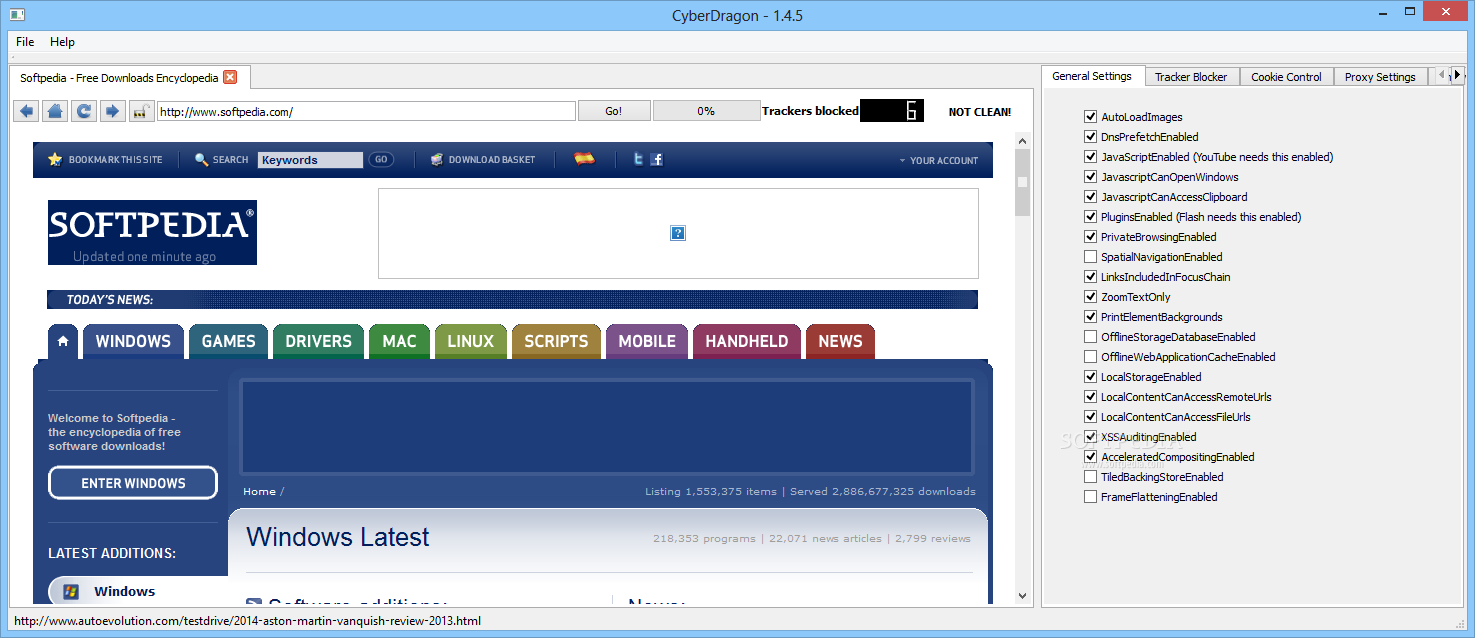 |
| CyberDragon allows you to browse the Internet and configure the browsing settings from the main window. |
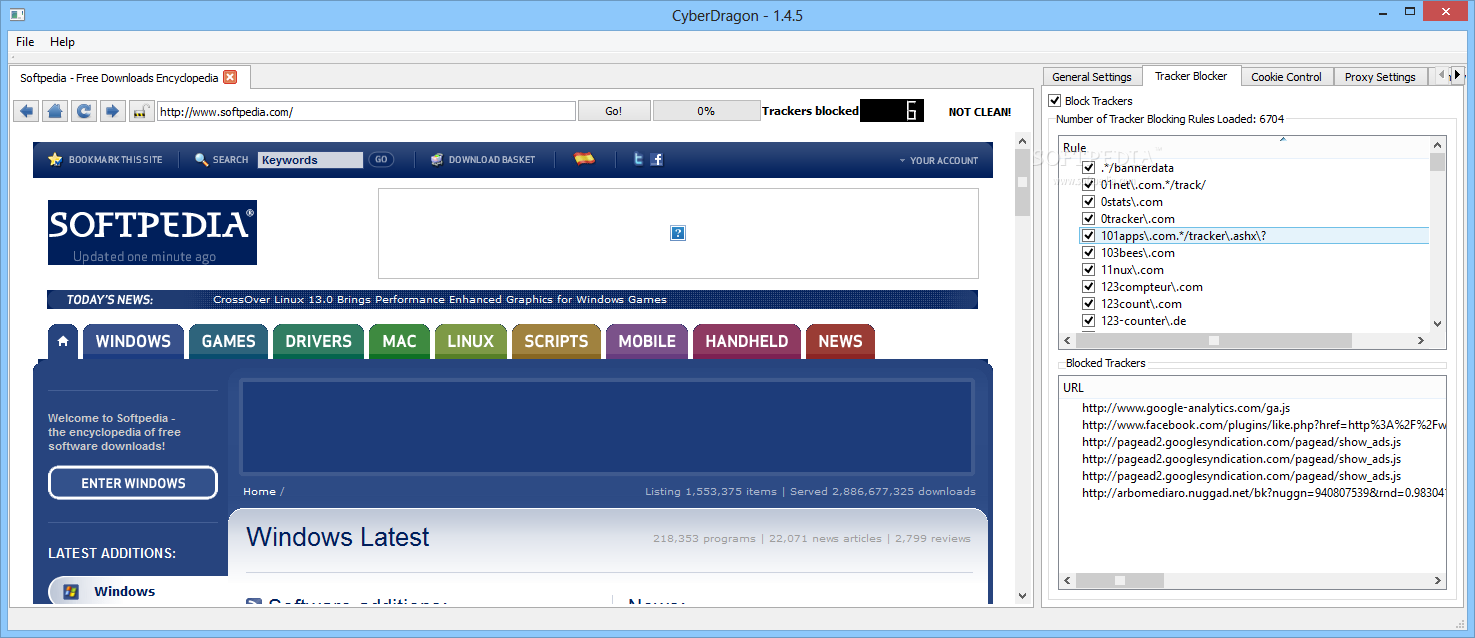 |
| he embedded tracker blocker allows you to select the trackers that will be allowed and view the ones detected on the current page. |
Download Here
Subscribe to:
Posts (Atom)